Self-Host Honcho on Kubernetes with LiteLLM, Redis, and GitHub Copilot
A self-hosted memory service for Hermes, with LiteLLM as the model gateway and GitHub Copilot as an upstream provider.
Architecture at a glance
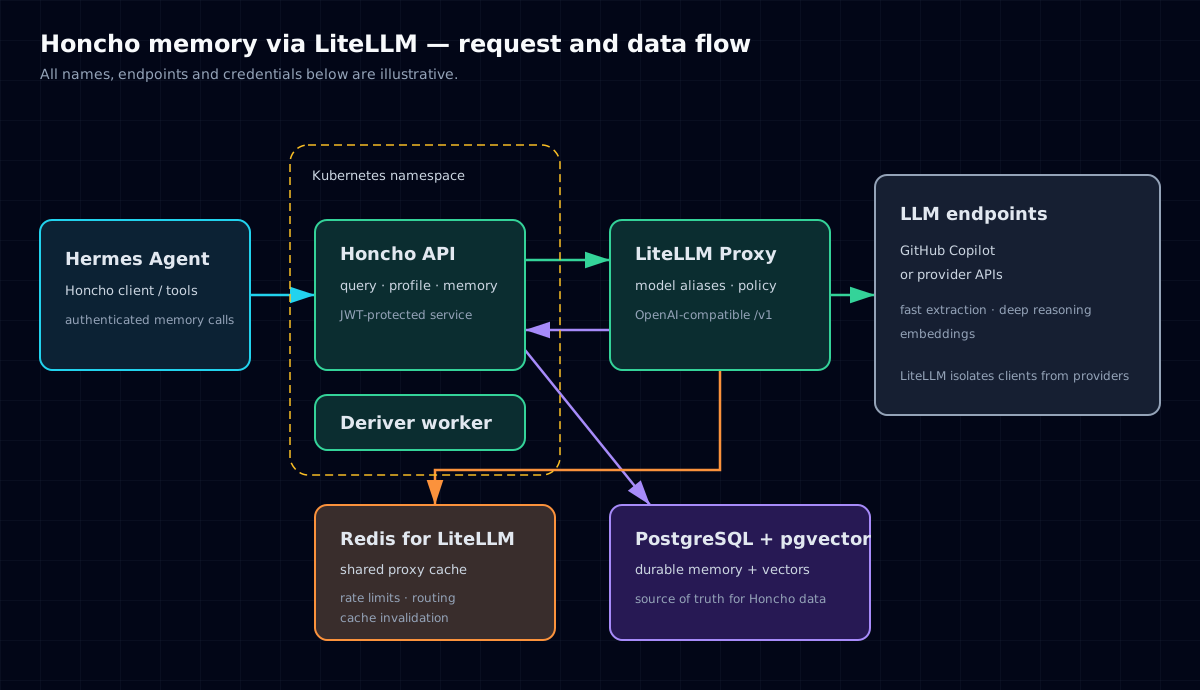
The request path is deliberately split into specialised layers:
- Hermes asks Honcho to search, retrieve, derive, or reason over long-term memory.
- Honcho owns the memory domain: API/authentication, PostgreSQL + pgvector persistence, and background derivation.
- LiteLLM is the only LLM-facing gateway. Honcho calls its OpenAI-compatible
/v1API using stable aliases rather than knowing provider-specific model IDs. - Redis is configured by LiteLLM as its shared proxy cache and coordination store — it is not a Honcho cache pod in this design.
- GitHub Copilot or another upstream provider performs generation and embeddings.
That separation means an application such as Honcho does not need to be rewritten when the upstream provider, model, routing policy, key, quota, or cache policy changes.
Why put LiteLLM and Redis in the middle?
LiteLLM is the provider boundary
Honcho can use any OpenAI-compatible endpoint for generation and embeddings.[3] LiteLLM turns that into a single internal API and a small set of application-specific aliases:
| Alias | Purpose | Example upstream model | Why it is separated |
|---|---|---|---|
honcho-fast | Derivation, extraction, small summaries | Claude Haiku-class model | High-frequency work; optimize latency and cost |
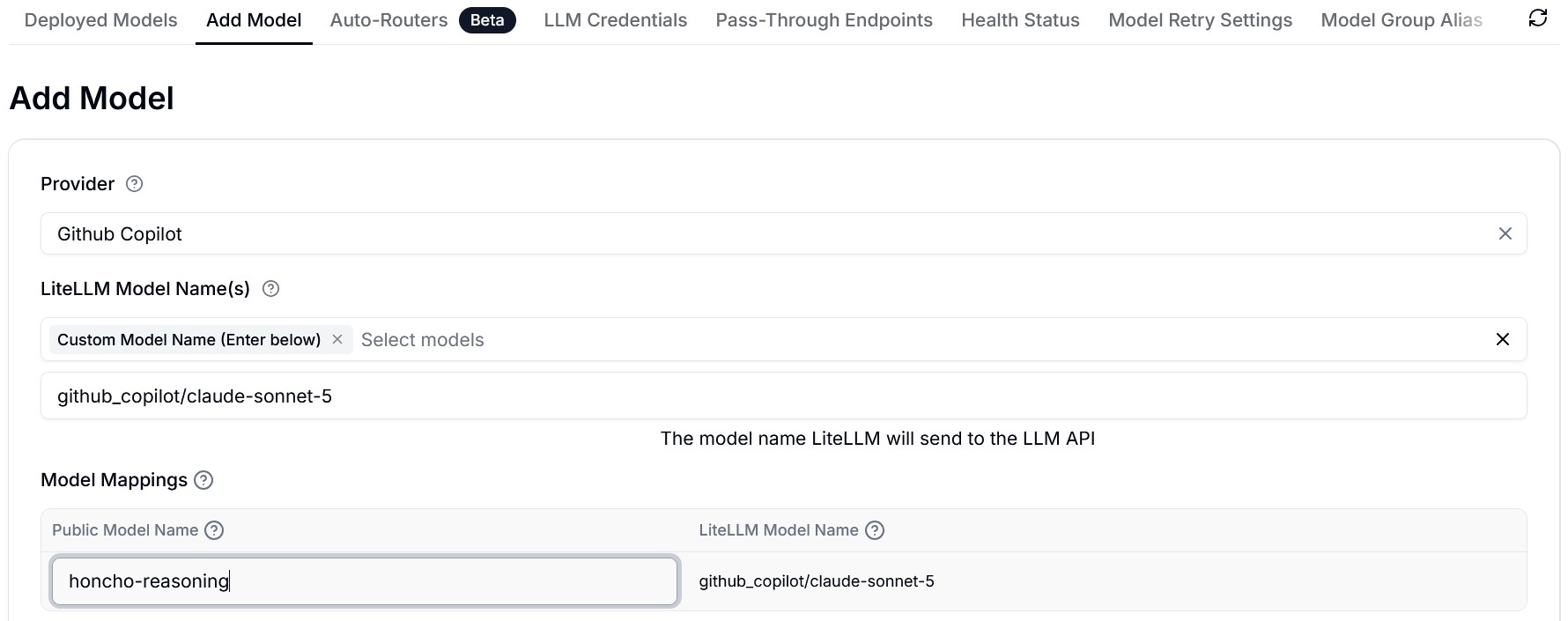
honcho-reasoning | Medium, high, and max-depth synthesis | Claude Sonnet-class model | Reserve deeper reasoning for the requests that justify it |
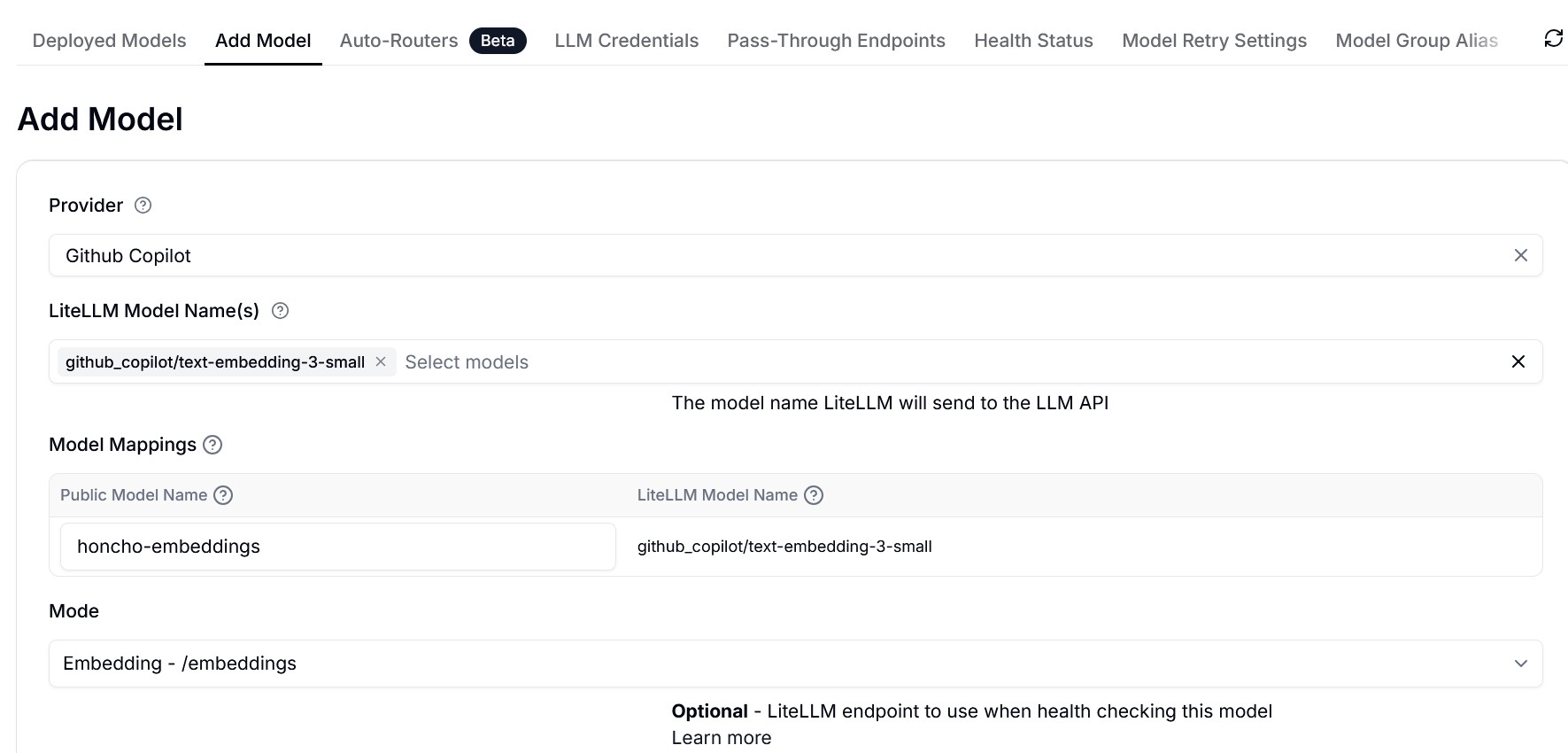
honcho-embeddings | Vector representation for memory retrieval | text-embedding-3-small | Embeddings are a distinct workload and endpoint type |
The aliases are the contract that Honcho depends on. LiteLLM maps that contract to an upstream provider and can centralise virtual keys, budgets, rate limits, fallbacks, logs, and routing. This also lets you replace a model without editing the Kubernetes deployment.
LiteLLM documents GitHub Copilot as an OAuth device-flow provider and supports both chat/reasoning calls and embeddings through the proxy.[2] Store the provider session in persistent storage owned by LiteLLM; do not expect an interactive OAuth session stored in a disposable container filesystem to survive a redeploy.
Redis is LiteLLM’s shared cache
In this pattern, Redis belongs to LiteLLM, not to Honcho. Honcho keeps durable memory in PostgreSQL + pgvector and sends every model/embedding request to LiteLLM. LiteLLM then uses Redis for its own proxy-wide state:
- exact-match response cache, including repeated embedding calls;
- shared cache invalidation across LiteLLM workers or replicas;
- router, cooldown and rate-limit coordination;
- shared state needed when the proxy scales beyond one process.
LiteLLM documents Redis as the sensible default once the proxy has more than one worker, because an in-memory cache is isolated per process while Redis is shared.[1] That gives one cache policy and one observation point for every Honcho request flowing through the gateway.
Configure both LiteLLM’s router state and its response cache to point to Redis. A representative configuration is:
# LiteLLM proxy configuration — illustrative only
router_settings:
  redis_host: os.environ/REDIS_HOST
  redis_port: os.environ/REDIS_PORT
  redis_password: os.environ/REDIS_PASSWORD

litellm_settings:
  cache: true
  cache_params:
    type: redis
    host: os.environ/REDIS_HOST
    port: os.environ/REDIS_PORT
    password: os.environ/REDIS_PASSWORD
    supported_call_types: ["completion", "acompletion", "embedding", "aembedding"]
Do not enable semantic response caching blindly for an agentic memory workload. Exact request caching is predictable; semantic caching can return a near-match for a different prompt, which is rarely what you want in a stateful tool workflow.[1]
Why these three model roles?
A memory system does not need its most expensive model for every operation.
1. Fast model: extraction and summaries
Honcho’s routine work includes deriving facts from conversations, making compact summaries, and processing frequent small updates. A fast, capable model is a better fit than a heavyweight reasoning model here because the operations are numerous, bounded, and usually structured.
2. Reasoning model: dialectic synthesis
Use the deeper model only for medium/high/max reasoning: reconciling conflicting memories, answering a nuanced question about a person or project, or producing a careful synthesis. This is where a stronger model pays for itself, while reserving it avoids turning basic retrieval into an expensive operation.
3. Embedding model: retrieval, not prose
text-embedding-3-small creates vector representations used to retrieve related memory. It does not write responses for the user. Separating it into honcho-embeddings prevents an accidental configuration change from sending embedding calls to a chat model and makes its access policy, budget, and health checks explicit.
The key design principle is not the exact brand or model version. It is the workload-to-model mapping: cheap and fast for routine processing, strong reasoning only when requested, and a dedicated embedding endpoint for vector search.
Prerequisites
This guide assumes:
- a working Kubernetes cluster (MicroK8s is used in the examples);
- a private namespace such as
privateapps; - an internal LiteLLM Proxy endpoint reachable from pods;
- a LiteLLM virtual key restricted to the three
honcho-*aliases; - persistent storage for PostgreSQL;
- a trusted internal ingress or another controlled way to reach Honcho;
- backups for PostgreSQL before treating it as a source of valuable memory.
The examples intentionally use placeholder values such as LITELLM_PROXY_URL, example.internal, and CHANGE_ME. They contain no real credentials or addresses.
Part 1 — Configure LiteLLM
1. Persist GitHub Copilot OAuth state
GitHub Copilot authentication uses OAuth device flow. The first request requires a human to open the verification URL and enter the device code; LiteLLM then stores the credentials for later requests.[2]
For a containerised LiteLLM proxy, mount a persistent volume for the token directory. The path below is illustrative:
# docker-compose.yaml or an equivalent container deployment — example only
services:
  litellm:
    image: ghcr.io/berriai/litellm:PINNED_VERSION
    environment:
      GITHUB_COPILOT_TOKEN_DIR: /container_data/litellm/github_copilot
    volumes:
      - /container-data/litellm/github_copilot:/container_data/litellm/github_copilot
2. Create stable model aliases
Create three models in the LiteLLM Admin UI, or declare equivalent aliases in its configuration. The upstream names below are examples: select the models available to your GitHub Copilot subscription and LiteLLM version.
# litellm-config.yaml — illustrative only
model_list:
  - model_name: honcho-fast
    litellm_params:
      model: github_copilot/claude-haiku-4.5

  - model_name: honcho-reasoning
    litellm_params:
      model: github_copilot/claude-sonnet-5

  - model_name: honcho-embeddings
    model_info:
      mode: embedding
    litellm_params:
      model: github_copilot/text-embedding-3-small
LiteLLM’s GitHub Copilot provider documentation shows the same pattern: give the proxy a model alias, set model_info.mode: embedding for an embedding model, and map it to the GitHub Copilot provider model.[2]
Screenshot placeholders
Place the two screenshots provided with this article in this page bundle:
content/en/ai/honcho-litellm-github-copilot/images/
├── litellm1.jpg  # honcho-embeddings
└── litellm2.jpg  # honcho-reasoning
honcho-embeddings
honcho-reasoning
3. Create a least-privilege virtual key
Create a virtual key for Honcho and restrict it to:
honcho-fast
honcho-reasoning
honcho-embeddings
Set an explicit budget and an expiry/review cadence appropriate to the environment. The point is not merely cost control: the allowlist prevents a compromised or misconfigured Honcho pod from invoking every model exposed by the shared gateway.
4. Verify LiteLLM before Kubernetes
From a trusted machine, test the aliases before deploying Honcho. Replace all placeholder values locally; do not save the key in shell history.
export LITELLM_BASE_URL="https://litellm.example.internal/v1"
export LITELLM_API_KEY="REDACTED"

# Chat / extraction model
curl --fail --silent --show-error "$LITELLM_BASE_URL/chat/completions" \
  -H 'Content-Type: application/json' \
  -H "Authorization: Bearer $LITELLM_API_KEY" \
  --data '{
    "model": "honcho-fast",
    "messages": [{"role": "user", "content": "Reply with OK."}]
  }'

# Embedding model
curl --fail --silent --show-error "$LITELLM_BASE_URL/embeddings" \
  -H 'Content-Type: application/json' \
  -H "Authorization: Bearer $LITELLM_API_KEY" \
  --data '{
    "model": "honcho-embeddings",
    "input": "Honcho embedding health check"
  }'
Expected outcome: both calls return HTTP 200, the chat request has a completion, and the embedding request contains a numeric vector. Test honcho-reasoning separately only when you need to validate its configured upstream model.
Part 2 — Deploy Honcho on Kubernetes
1. Keep secrets out of the manifest
The deployment needs database credentials, a JWT signing secret, and the LiteLLM virtual key. Create them as a Kubernetes Secret outside the YAML committed to documentation.
# Example only. Generate real high-entropy values locally.
kubectl -n privateapps create secret generic honcho-runtime \
  --from-literal=postgres-password='CHANGE_ME' \
  --from-literal=db-connection-uri='postgresql+psycopg://honcho:CHANGE_ME@honcho-postgres:5432/honcho' \
  --from-literal=auth-jwt-secret='CHANGE_ME_64_CHARACTERS_OR_MORE' \
  --from-literal=litellm-api-key='REDACTED'
Use an external secrets manager or your existing secret workflow for a real deployment. The command is deliberately only a teaching example.
2. Example manifest
The following manifest is a compact representation of the Honcho side of the architecture. It creates:
- PostgreSQL with the
vectorextension for durable memory and semantic retrieval; - one Honcho API deployment;
- one background derivation worker;
- ClusterIP services, so Honcho and PostgreSQL are not exposed outside the namespace.
Redis is configured and operated with the LiteLLM proxy, so it is intentionally absent from this Honcho manifest.
# honcho.example.yaml — illustrative only
---
apiVersion: v1
kind: ConfigMap
metadata:
  name: honcho-postgres-init
  namespace: privateapps
data:
  init.sql: |
    CREATE EXTENSION IF NOT EXISTS vector;
---
apiVersion: v1
kind: Service
metadata:
  name: honcho-postgres
  namespace: privateapps
spec:
  type: ClusterIP
  selector:
    app: honcho-postgres
  ports:
    - name: postgres
      port: 5432
      targetPort: postgres
---
apiVersion: apps/v1
kind: Deployment
metadata:
  name: honcho-postgres
  namespace: privateapps
spec:
  replicas: 1
  strategy:
    type: Recreate
  selector:
    matchLabels:
      app: honcho-postgres
  template:
    metadata:
      labels:
        app: honcho-postgres
    spec:
      containers:
        - name: postgres
          image: pgvector/pgvector:pg15 # pin a tested tag/digest in production
          ports:
            - name: postgres
              containerPort: 5432
          env:
            - name: POSTGRES_DB
              value: honcho
            - name: POSTGRES_USER
              value: honcho
            - name: POSTGRES_PASSWORD
              valueFrom:
                secretKeyRef:
                  name: honcho-runtime
                  key: postgres-password
            - name: PGDATA
              value: /var/lib/postgresql/data/pgdata
          volumeMounts:
            - name: data
              mountPath: /var/lib/postgresql/data
            - name: init-sql
              mountPath: /docker-entrypoint-initdb.d/init.sql
              subPath: init.sql
              readOnly: true
          readinessProbe:
            exec:
              command: ["sh", "-ec", "pg_isready -U honcho -d honcho"]
          resources:
            requests: {cpu: 100m, memory: 512Mi}
            limits: {cpu: 500m, memory: 1Gi}
      volumes:
        - name: data
          persistentVolumeClaim:
            claimName: honcho-postgres-data # create/backup this PVC separately
        - name: init-sql
          configMap:
            name: honcho-postgres-init
---
apiVersion: v1
kind: Service
metadata:
  name: honcho
  namespace: privateapps
spec:
  type: ClusterIP
  selector:
    app: honcho-api
  ports:
    - name: http
      port: 8000
      targetPort: http
---
apiVersion: apps/v1
kind: Deployment
metadata:
  name: honcho-api
  namespace: privateapps
spec:
  replicas: 1
  selector:
    matchLabels:
      app: honcho-api
  template:
    metadata:
      labels:
        app: honcho-api
    spec:
      initContainers:
        - name: wait-for-postgres
          image: pgvector/pgvector:pg15
          command: ["sh", "-ec", "until pg_isready -h honcho-postgres -U honcho -d honcho; do sleep 2; done"]
          env:
            - name: PGPASSWORD
              valueFrom:
                secretKeyRef:
                  name: honcho-runtime
                  key: postgres-password
      containers:
        - name: honcho-api
          image: ghcr.io/plastic-labs/honcho:PINNED_VERSION # pin digest after validation
          command: ["sh", "-ec"]
          args:
            - >-
              /app/.venv/bin/python scripts/provision_db.py &&
              exec /app/.venv/bin/fastapi run --host 0.0.0.0 src/main.py
          ports:
            - name: http
              containerPort: 8000
          env:
            - name: DB_CONNECTION_URI
              valueFrom:
                secretKeyRef:
                  name: honcho-runtime
                  key: db-connection-uri
            - name: AUTH_USE_AUTH
              value: "true"
            - name: AUTH_JWT_SECRET
              valueFrom:
                secretKeyRef:
                  name: honcho-runtime
                  key: auth-jwt-secret
            - name: LLM_OPENAI_API_KEY
              valueFrom:
                secretKeyRef:
                  name: honcho-runtime
                  key: litellm-api-key
            - name: VECTOR_STORE_TYPE
              value: pgvector
            - name: EMBEDDING_MODEL_CONFIG__TRANSPORT
              value: openai
            - name: EMBEDDING_MODEL_CONFIG__MODEL
              value: honcho-embeddings
            - name: EMBEDDING_MODEL_CONFIG__OVERRIDES__BASE_URL
              value: https://litellm.example.internal/v1
            - name: DERIVER_MODEL_CONFIG__TRANSPORT
              value: openai
            - name: DERIVER_MODEL_CONFIG__MODEL
              value: honcho-fast
            - name: DERIVER_MODEL_CONFIG__OVERRIDES__BASE_URL
              value: https://litellm.example.internal/v1
            - name: DERIVER_MODEL_CONFIG__STRUCTURED_OUTPUT_MODE
              value: json_object
            - name: SUMMARY_MODEL_CONFIG__TRANSPORT
              value: openai
            - name: SUMMARY_MODEL_CONFIG__MODEL
              value: honcho-fast
            - name: SUMMARY_MODEL_CONFIG__OVERRIDES__BASE_URL
              value: https://litellm.example.internal/v1
            - name: DIALECTIC_LEVELS__medium__MODEL_CONFIG__TRANSPORT
              value: openai
            - name: DIALECTIC_LEVELS__medium__MODEL_CONFIG__MODEL
              value: honcho-reasoning
            - name: DIALECTIC_LEVELS__medium__MODEL_CONFIG__OVERRIDES__BASE_URL
              value: https://litellm.example.internal/v1
            - name: DIALECTIC_LEVELS__high__MODEL_CONFIG__TRANSPORT
              value: openai
            - name: DIALECTIC_LEVELS__high__MODEL_CONFIG__MODEL
              value: honcho-reasoning
            - name: DIALECTIC_LEVELS__high__MODEL_CONFIG__OVERRIDES__BASE_URL
              value: https://litellm.example.internal/v1
            - name: DIALECTIC_LEVELS__max__MODEL_CONFIG__TRANSPORT
              value: openai
            - name: DIALECTIC_LEVELS__max__MODEL_CONFIG__MODEL
              value: honcho-reasoning
            - name: DIALECTIC_LEVELS__max__MODEL_CONFIG__OVERRIDES__BASE_URL
              value: https://litellm.example.internal/v1
            - name: DREAM_ENABLED
              value: "false"
            - name: TELEMETRY_ENABLED
              value: "false"
          startupProbe:
            httpGet: {path: /health, port: http}
            periodSeconds: 5
            failureThreshold: 24
          readinessProbe:
            httpGet: {path: /health, port: http}
          livenessProbe:
            httpGet: {path: /health, port: http}
          resources:
            requests: {cpu: 100m, memory: 256Mi}
            limits: {cpu: 500m, memory: 768Mi}
---
apiVersion: apps/v1
kind: Deployment
metadata:
  name: honcho-deriver
  namespace: privateapps
spec:
  replicas: 1
  selector:
    matchLabels:
      app: honcho-deriver
  template:
    metadata:
      labels:
        app: honcho-deriver
    spec:
      containers:
        - name: honcho-deriver
          image: ghcr.io/plastic-labs/honcho:PINNED_VERSION
          command: ["/app/.venv/bin/python", "-m", "src.deriver"]
          # YAML anchors do not cross `---` document boundaries. Repeat the
          # worker's required configuration explicitly in a real manifest.
          env:
            - name: DB_CONNECTION_URI
              valueFrom:
                secretKeyRef:
                  name: honcho-runtime
                  key: db-connection-uri
            - name: LLM_OPENAI_API_KEY
              valueFrom:
                secretKeyRef:
                  name: honcho-runtime
                  key: litellm-api-key
            - name: VECTOR_STORE_TYPE
              value: pgvector
            - name: EMBEDDING_MODEL_CONFIG__TRANSPORT
              value: openai
            - name: EMBEDDING_MODEL_CONFIG__MODEL
              value: honcho-embeddings
            - name: EMBEDDING_MODEL_CONFIG__OVERRIDES__BASE_URL
              value: https://litellm.example.internal/v1
            - name: DERIVER_MODEL_CONFIG__TRANSPORT
              value: openai
            - name: DERIVER_MODEL_CONFIG__MODEL
              value: honcho-fast
            - name: DERIVER_MODEL_CONFIG__OVERRIDES__BASE_URL
              value: https://litellm.example.internal/v1
            - name: DERIVER_MODEL_CONFIG__STRUCTURED_OUTPUT_MODE
              value: json_object
            - name: SUMMARY_MODEL_CONFIG__TRANSPORT
              value: openai
            - name: SUMMARY_MODEL_CONFIG__MODEL
              value: honcho-fast
            - name: SUMMARY_MODEL_CONFIG__OVERRIDES__BASE_URL
              value: https://litellm.example.internal/v1
            - name: DIALECTIC_LEVELS__medium__MODEL_CONFIG__TRANSPORT
              value: openai
            - name: DIALECTIC_LEVELS__medium__MODEL_CONFIG__MODEL
              value: honcho-reasoning
            - name: DIALECTIC_LEVELS__medium__MODEL_CONFIG__OVERRIDES__BASE_URL
              value: https://litellm.example.internal/v1
            - name: DIALECTIC_LEVELS__high__MODEL_CONFIG__TRANSPORT
              value: openai
            - name: DIALECTIC_LEVELS__high__MODEL_CONFIG__MODEL
              value: honcho-reasoning
            - name: DIALECTIC_LEVELS__high__MODEL_CONFIG__OVERRIDES__BASE_URL
              value: https://litellm.example.internal/v1
            - name: DIALECTIC_LEVELS__max__MODEL_CONFIG__TRANSPORT
              value: openai
            - name: DIALECTIC_LEVELS__max__MODEL_CONFIG__MODEL
              value: honcho-reasoning
            - name: DIALECTIC_LEVELS__max__MODEL_CONFIG__OVERRIDES__BASE_URL
              value: https://litellm.example.internal/v1
            - name: DREAM_ENABLED
              value: "false"
            - name: TELEMETRY_ENABLED
              value: "false"
          resources:
            requests: {cpu: 100m, memory: 256Mi}
            limits: {cpu: 750m, memory: 1Gi}
About the environment variables
LLM_OPENAI_API_KEYis the LiteLLM virtual key, not the GitHub token....BASE_URLpoints at LiteLLM’s OpenAI-compatible/v1endpoint.honcho-fast,honcho-reasoning, andhoncho-embeddingsare aliases controlled by LiteLLM.- This manifest deliberately contains no
CACHE_URLor Redis pod. LiteLLM owns the Redis-backed response cache and proxy coordination. DREAM_ENABLED=falseis an intentional cost-control choice for this pattern. Enable consolidation only after you understand its cadence and cost.- The worker repeats the same core model configuration as the API because it makes asynchronous derivation independently reproducible.
3. Apply and observe
Apply only after reviewing the rendered YAML and confirming that the Secret exists:
kubectl apply --dry-run=server -f honcho.example.yaml
kubectl apply -f honcho.example.yaml

kubectl -n privateapps rollout status deployment/honcho-postgres --timeout=180s
kubectl -n privateapps rollout status deployment/honcho-api --timeout=300s
kubectl -n privateapps rollout status deployment/honcho-deriver --timeout=300s

# LiteLLM and its Redis cache are operated and observed separately.
Verification checklist
Validate the deployment in layers rather than assuming a running pod proves the full path:
# 1. Kubernetes health
kubectl -n privateapps get deploy,pods,svc

# 2. Honcho API health from inside the cluster
kubectl -n privateapps run honcho-healthcheck --rm -it \
  --image=curlimages/curl --restart=Never -- \
  curl --fail http://honcho:8000/health

# 3. Verify PostgreSQL extension
kubectl -n privateapps exec deploy/honcho-postgres -- \
  psql -U honcho -d honcho -c '\\dx'

# 4. Check the derivation worker without exposing secrets
kubectl -n privateapps logs deploy/honcho-deriver --tail=100
Then use a real Hermes memory operation and confirm all of the following:
- Hermes can authenticate to Honcho;
- a fast operation succeeds through
honcho-fast; - an embedding request succeeds through
honcho-embeddings; - a medium/high reasoning request reaches
honcho-reasoning; - LiteLLM usage/logs show only the three permitted aliases;
- no provider credential appears in logs, manifests, browser history, or Git.
Troubleshooting
| Symptom | Likely cause | First check |
|---|---|---|
| Honcho API stays unready | PostgreSQL is not reachable or migrations fail | kubectl logs deploy/honcho-api and pg_isready |
| Deriver runs but creates no useful memory | Wrong model alias, missing structured-output support, or worker configuration mismatch | Worker logs; test honcho-fast directly through LiteLLM |
| Vector search fails | vector extension or embedding alias is missing | \\dx in PostgreSQL; LiteLLM /embeddings test |
| 401/403 from LiteLLM | Virtual key is absent, invalid, expired, or model scope is too narrow | LiteLLM key policy and pod Secret reference |
| It worked until redeploy | OAuth token directory was ephemeral | Mount and protect a persistent LiteLLM token directory |
| Costs rise unexpectedly | Deep reasoning is being used for routine work or consolidation is too frequent | Alias-level usage; dialectic level; DREAM_ENABLED |
| LiteLLM cache misses after restart | Redis is unavailable, was restarted, or is misconfigured in the LiteLLM proxy | LiteLLM /cache/ping, Redis connection settings, and cache metrics; Honcho memory remains in PostgreSQL |
Related reading
Sources
[1] https://docs.litellm.ai/docs/proxy/caching — LiteLLM Proxy Caching [2] https://docs.litellm.ai/docs/providers/github_copilot — LiteLLM GitHub Copilot provider [3] https://honcho.dev/docs/v3/contributing/self-hosting — Honcho self-hosting
Feedback
Was this page helpful?
Glad to hear it! Please tell us how we can improve.
Sorry to hear that. Please tell us how we can improve.